Verizon Usage Monitor for Mozilla Firefox

Tired of paying ridiculous overage fees for minutes or
data used with your Verizon cellular plan? Verizon Usage Monitor is for you!
Verizon Usage Monitor is an extension for
Mozilla Firefox that will help prevent you from going over your wireless
plan's monthly allotment of minutes or data by enabling you to easily monitor your
minutes and data usage for your Verizon account. Simply being aware of your
current usage can help you carefully consider future usage, encourage someone on
your account to minimize their usage until the next billing cycle, or call Verizon
to increase your minute allowance.
more...
The monitor will sit quietly in the status bar, at the bottom of any Firefox window.
After initial configuration, all you need to do to check your usage is glance at
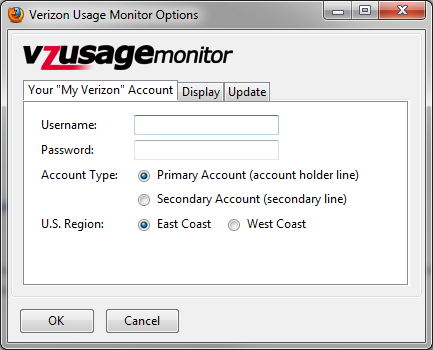
that portion of your screen. Setup is a breeze. Just give it your "My
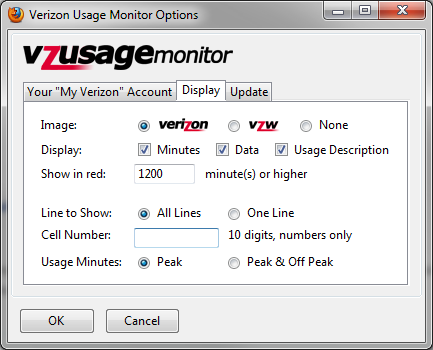
Verizon" username and password, configure exactly what type of data you'd like to
see, and you're on your way! Your login credentials to Verizon are securely
stored in Firefox's own password manager, and are never transmitted to me or any
other third party. They are only used to securely retrieve your current usage
directly from Verizon.
Verizon Usage Monitor will enable you to monitor the minutes and data usage for
a single line, multiple lines on a family share plan, or the data for a cellular
modem or broadband access device.
This extension is a re-coded and improved version of
Winston Huang's Verizon Minutes Used. This project
was created with Winston's blessing. It has undergone many updates, including
support for new Firefox 4.0 requirements, configurations changes, login reliability,
support for data usage monitoring, and more.
Enable & Begin Using...
Verizon Usage Monitor lives on Firefox's Add-ons bar (formerly status bar)! The Add-ons bar is hidden by default on Firefox beginning with version 4.0. Enable the Add-ons Bar by going to
View >>
Toolbars >> Add-on Bar
.
Shortcut keys:
- Windows: [Ctrl + /]
-
Mac OS X: [Command + /]
Donations

Obviously donations are
not required for use, but are always welcome. I do spend a good amount of
my time working on these projects. Time spent away from my family and friends.
Donations made with the button to the right are secured by PayPal and will help
to justify the time I spend working on these projects rather than with people in
my life.
Known Issues
|
Verizon Usage Monitor doesn't work when using a version before 1.34 or stopped around 10/5/2013
|
Show Details
|
|
Confirmed:
|
2013-10-07
|
|
Issue:
|
Due to changes in how Verizon Wireless displays their webpage, Verizon Usage Monitor
stopped functioning properly as it has not yet been updated to properly parse the new
HTML.
|
|
Fix:
|
I have released version 1.34 with fixes for the issues with Verizon Usage Monitor caused by Verizon's newly formatted usage summary page. Please Upgrade to version 1.34 or later.
|
|
Verizon Usage Monitor is not displayed by default on Firefox 4.0+
|
Show Details
|
|
Confirmed:
|
2011-03-25
|
|
Issue:
|
Verizon Usage Monitor does not appear to work on Firefox 4.0/5.0 because Verizon
Usage Monitor is located on the "status bar" on Firefox, which was renamed to "Add-ons
Bar" and hidden by default in Firefox 4.0/5.0. The extension actually works
as expected, but is simply hidden due to Firefox's new default configuration.
|
|
Fix:
|
I am debating whether or not to find a new home for VzUm on the Firefox user inteface.
|
|
Temporary Workaround:
|
Re-enable the Add-ons Bar by going to View >> Toolbars >> Add-on Bar.
Windows: [Ctrl + /] -- Mac OS X: [Command + /]
|
|
FIX AVAILABLE: The status bar shows up with "0," "null," or "error" when using
a version before 1.32
|
Show Details
|
|
Confirmed:
|
2011-07-01
|
|
Issue:
|
The status bar started saying 0 minutes, "null null" or "error" in place of the
value for data usage. This is because on June 21, 2011, Verizon changed the
way data usage is displayed on their website to a format that makes it unavailable
to versions of Verizon Usage Monitor earlier than 1.32.
|
|
Fix:
|
Upgrade to version 1.32 or later.
|
|
FIX AVAILABLE: "My Verizon" account credentials are not updated correctly
when using a version before 1.32
|
Show Details
|
|
Confirmed:
|
2010-08-31
|
|
Issue:
|
When trying to change your My Verizon account credentials within Verizon Usage Monitor's
options, the extension will not remove all instances of the old credentials and
will erroneously use the old credentials for login purposes. This results
in "unable to retrieve data," or 0 / null errors if the credentials were originally
typed incorrectly or if they were changed on Verizon's site.
|
|
Fix:
|
Upgrade to version 1.32 or later, which correctly removes old credentials
for Verizon's site from the Firefox Password Manager when you set the options correctly.
|
|
Secondary Workaround:
|
You can remove the credentials from Firefox's password manager. In Firefox's
options, on the "Security" tab, click the "Saved Passwords"
button. Type "verizon" (no quotation marks) in the "Search"
text box, and remove all saved passwords for the results. The next time you
enter the My Verizon credentials into the extension, they will be stored appropriately.
|
|
FIX AVAILABLE: The status bar shows up with "null" or "error" when using a version
before 1.26
|
Show Details
|
|
Confirmed:
|
2010-08-31
|
|
Issue:
|
The status bar started saying "null null" or "error" in place of the value for data
usage. This is because Verizon changed the way data usage is displayed on
their website to a format that makes it unavailable to versions of Verizon Usage
Monitor earlier than 1.26.
|
|
Fix:
|
Upgrade to version 1.26 or later.
|
Support
If you need help or would like to submit a bug report and the issue you are having
is not in the Known Issues section above,
submit
your bug report to me
. If you would like to make a feature request,
submit comments, or anything else directly about this extension,
send
your message with this form
.
Changelog
Want to be easily notifed of changes to Verizon Usage Monitor? Subscribe to
the version change RSS feed, hosted by Mozilla Add-ons!
-
Version 1.34 - December 21, 2013
- Fixed the usage parsing that was broken when Verizon changed their summary page on October 5th, 2013
-
Version 1.32 - July 20, 2011
- Changed error message received by users when usage retrieval fails due to third-party cookie settings.
- Warnings will not display messages to the users, but errors will.
-
Version 1.31 - July 12, 2011
- Removed synchronous XMLHttpRequest's in favor of asynchronous.
-
Changed setTimeout and setInterval methods to use function arguments instead of
string arguments.
-
Version 1.30 - July 5, 2011
- Fixed a bug where the "Show in Red" threshold was not being respected.
-
Version 1.29 - July 5, 2011
-
Fixed minor bug where M2M Off Peak minutes were being shown as regular Off Peak
minutes if "One Line" display was selected
-
Fixed display bug where accounts without "Friends and Family" features in their
account would have usage of 0 reported
- Added "North" region
-
Version 1.281 - July 3, 2011
- Fixed data display issue when "One Line" was not selected in the extension.
-
Version 1.28 - July 3, 2011
-
Fixed bug where Verizon Usage Monitor was not saving passwords properly in modern
versions of Firefox, if a password was already present for https://www.verizonwireless.com
or http://www.verizonwireless.com in the Firefox Password Manager.
-
Version 1.271 - July 2, 2011
-
Fixed "Peak & Off Peak" display setting bug where the numbers would be concatenated
instead of correctly added.
-
Version 1.27 - July 1, 2011
-
Updated to reflect changes to Verizon's Usage page -- no version prior to 1.27 will
function properly as a result.
- Compatible with Mozilla Firefox 3.0 - 6.*
-
Version 1.26 - August 31, 2010
- Reports current state more accurately in the statusbar
-
Changed regular expression to retrieve data usage from Verizon's new summary screen
changes
- Compatible with Mozilla Firefox 3.0 - 4.0b6pre
-
Version 1.24 - August 16, 2010
- Added tabs to options dialog, to help accommodate users with shorter screen resolutions.
-
On load, Verizon Usage Monitor will now open the options screen instead of immediately
warning you about an incorrect login.
- About window content and layout changes.
- install.rdf description updated to reflect current version.
-
Version 1.23 - August 15, 2010
- Added option to hide or display the usage description ("mins") from the statusbar.
-
Version 1.22 - August 15, 2010
-
Fixed bug where images setting of "none" was not being respected (thanks to Greg
for pointing this out)
-
Image setting is now updated on refresh command, before usage is retrieved, to ensure
proper setting regardless of valid response from Verizon
-
Version 1.21 - August 15, 2010
-
Added data support for Verizon's different measurement scales (reporting megabytes
or gigabytes instead of only kilobytes).
-
Version 1.2 - August 14, 2010
-
Added support for data to the status bar tooltip, and allows configuring whether
to display data on the status bar tooltip itself.
- Made data line display show the configured "cell number's" data usage.
-
Version 1.1b52 - August 8, 2010
- Added support for Firefox 4.0 Beta 3
- Redesigned options dialog
- Menu reordered
-
Status bar menu creation method re-implemented to fix Firefox 4 beta 2's unsupported
background of the previous implementation
- Better Verizon login handling
-
Initial Version - July 7, 2010
- Code based on Verizon Minutes Used 2.1 by Winston Huang (http://verizon-minutes-used.blogspot.com/)